Journaux des modifications
Restez informé des dernières modifications et améliorations.
Restez informé des dernières modifications et améliorations.

16. Feb 2026
Partager
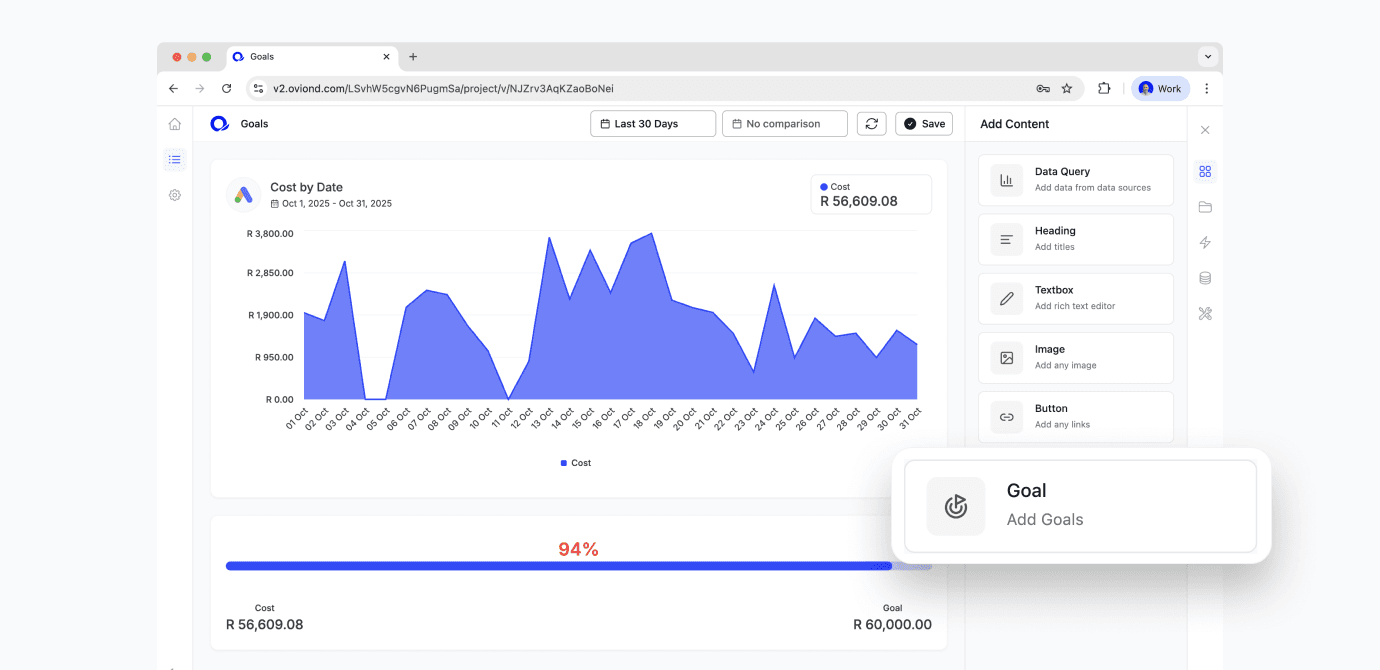
You can now add Goals to any project using the new Goal widget under Add Content. Drag it onto the canvas, pick any metric from any connected data source, and set a clear target to measure progress against.
You have two ways to define the goal:
Static goal: Set a fixed target number (e.g., 500 leads, R100k revenue, 3.5 ROAS).
Dynamic goal: Set a target based on percentage change using historical performance (e.g., “+15% vs last period”).
Once set, the widget shows goal progress at a glance, so you can see how close you are to hitting the target—and how much is left to go.
Best for
Agency dashboards where you want targets to be visible alongside performance
Client reporting where you want to show progress, not just numbers
Tracking KPIs that use fixed benchmarks or growth-based targets